
200+ comments. Darn good for answers.
Hi, I’m Greg!
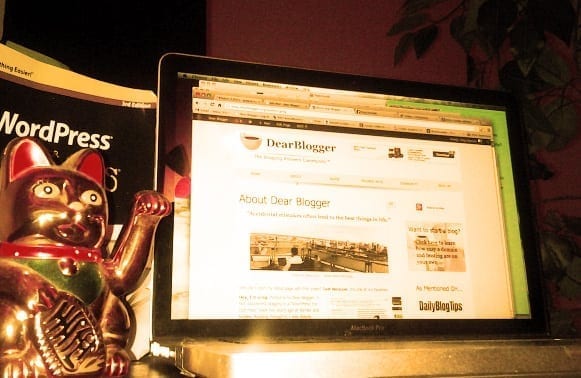
That’s a picture of my first MacBook and the WordPress book I read on one fateful train-ride home that got me into blogging. It was taken in Chinatown, NYC circa 2013.
Fast forward 4 years now and I’ve built around 50-75 blogs, a few of them reasonably successful. My goal is to teach you how to make a successful blog too.
A blog is like a painting – our 5th blogpost is better than our 1st and we all have a unique style. There’s no one way to do it right.
My first blog was a terrible mess of all my ideas but it taught me how to be online, write what people wanted to read (and didn’t), recruit other writers and organize things like images and ads on otherwise white blog space.
However within all the worries and stresses of creating a blog and putting yourself out there there are also many consistencies: strategies which always work and will help you create a beautiful blog with a growing, loving audience with whom you can blog for a living.
I hope to share these strategies with an up and coming blogger like you on this page!
How to make a WordPress blog – a complete beginner tutorial

That’s me looking all skeptical like you might be now. Don’t worry, this page is no fluff and I would never waste your time. It’s the real deal.
First off, in this web 3.0 world, I know that you want information fast. This page used to tell you things like personable, be giving and be a risk-taker but you already know this stuff from real life. To deliver you good information fast, I put by best advice on how to create your blog into this video (and regularly replace the video with my newer guides).
This video is called Create a WordPress Blog – 2017 – Make Any Kind of Blog and will show you:
✓ How to easily use WordPress.org with your own domain name
✓ The advantages of self-hosting
✓ How to setup Google Ads (Adsense) and how to get accepted to their program as a publisher (what you want as a Blogger)
✓ How to setup Google Analytics in a couple steps and track real blog visits
✓ What posts to right when you launch
✓ Where to get amazing images, how to edit them and touch them up, etc.
✓ How to create tons more like:
- A blogpost: Hello, world!
- A basic image/photo: Uploaded to WordPress and fitted nicely in the blogpost
- A URL link: To help you click back to Dear Blogger or over to HostGator, where setup begins
- A new theme: The whole design has been changed to a theme called Patchwork 1.2.1 (just one of thousands of free themes out there)
- A plugin: To add a contact form, and also we use the theme’s basic functions to add Facebook, Twitter, and +1 buttons to the blogpost for convenient sharing
✓ And that you really can make just about any kind of blog you see on the web or follow already
The video:
The video is 1 whole hour so I know that it might take some folks a night or even a whole week to get through. If you’d rather not watch, I’m going to cover the 5 most important areas of blogging below. I’ll give you a taste of everything, like a large sampler platter appetizer at your favorite restaurant 😉 You’ll have to ask for some specifics though.
How to make a blog that’s worth a large amount of money
Disclaimer Time: Blogging doesn’t have to be for a living.
But as you start a blog I bet you’re at least considering the chance that the blog you make might be become widely popular and worth a lot. It’s only natural.
If you’re the type of envisions blogging for a career, maybe making the next Huff Post on ________ or selling a blog someday you need to follow 3 steps.
- Use WordPress
- Blog every week
- Make your blog topic very specific at first
So let me explain those three things and why they are necessary.
1. Use WordPress
WordPress.org, or WordPress for short, is my favorite blogging software. I recommend it to everyone because when you make a blog with it you are instantly on the playing field with the likes of Forbes, Katy Perry, Tech Crunch, Tim Ferris Blog, Time.com, and thousands more. WordPress powers over 26% of the web’s most popular 10 million websites so it’s a no brainer to use them. It’s free to use, you just need to get a domain name and self-hosting space.
Sure, it was fun trying to get by with the free blog-hosting sites like Blogger and Tumblr was fun back in the day, but:
- You don’t get your own domain name, and that “.blogspot” or “.tumblr” is a constant reminder you don’t own your blog and that it can be taken down by someone else. I’m all about owning up to my work and this just wasn’t enough.
- You’re limited to how it’s all designed and monetized. Free blogs just look like free blogs, but WordPress.org (aka WordPress) can be made to look like the NewYorker.com, Beyonce.com, TheFourHourWorkWeek.com or any number of popular websites.
When I realized getting a domain and hosting (all you need to “self-host”) was just as easy as making a purchase on Amazon – but a whole lot more fun – it was on.
Once you make a WordPress blog you will understand. You’ll know how to make a real blog/website and will tell everyone and recommend it to everyone. Trust me.
2. Blog every week
This advice is more stylist than techie. The best way I can put it is this, when you create a blog you should pick topic you can write about every week. You can take any topic like “best cameras” and cover new angels, trends, photographers and such every week. You could write about stocks or work out tips every week. You could even right about your life every week. As long as you start excited and stay excited. Pick one of those topics you just write on and your fingers fly across the keyboard as your head nods and your foot taps away.
The “every week” part also means you need to publish on a schedule. It can be Tuesday mornings or Thursday afternoons or Sunday after brunch, and you can ask your readers, but breaking your schedule and not telling people why is a silent blog killer. People will be annoyed and won’t even tell you. It’s hard enough to follow blogs these days, and it’s your job as the author to be regular. This isn’t to give you pressure, it’s just to level with you. Imagine how hard it would be to watch your favorite sitcoms like Seinfeld or Friends if they were on at different times (okay maybe not that hard with Netflix and content sydication across networks, but you get the picture).
3. Make your blog topic very specific at first
Building a specific blog or a “niche-narrow” blog is important because a. people often arrive at your blog expecting one thing, like camera reviews or fitness guides or stock tips and b. it eases your load in that you only have to do one thing really well. Writing a blog about your entire life is the second blog killer. We all want to create a really busy blog and we’re tempted to put everything good we’ve done online, but this kind of randomness is only found on personal blogs that aren’t meant to become popular. Once you’ve acheived blogging fame in your specific, chosen niche and are a known expert on one amazing thing, then you can get all random. But not beforehand.
Additional reading (all my writing, kind of vain, but I like these ones)
THE Best Places to Blog (updated 2018 edition) – Survey ALL your options, it’s important. This ongoing list of 21 places to blog currently ranks #1 in Google for several competitive phrases and is well-worth your read. Plus if you comment, you may get some nice exposure 😉
How to Blog for Money – In one of the first guides I published here, we cover several legitimate ways to monetize a blog depending on where you’re at right now.
How Playboy Can Help Your Blog – For my first appearance at ProBlogger, I stole my roommate’s magazine to figure out how we can make our blogs irresistible too. It got pretty heated.
The Only SEO Your Blog Posts Needs – SEO (Search Engine Optimization) is hard for all of us at first. So in this post, we break down a few simple takeaways you can use to SEO your blog past others in your niche relatively quickly.
How I Got a Google PageRank 3 in 3 Months with Only 28 Backlinks – Building Google was tough; building PageRank is easy. This one is among the most read at the blog.
My readers constantly send me with little notes saying these articles broke down complex blogging concepts in an understandable manner. I’m positive you’ll find them useful.
How to make your new blog look beautiful right away

Beautiful images will invite people to explore your blog and join in on your adventure. If you don’t have time to take professional photos of your own, I recommend getting images from Pixabay. It’s amazing over there, they keep it all free and copyright free so you don’t have to worry, and most of the images are downright stunning for any kind of blog you’ll create.
For editing images, I recommend using Pixlr.com (free and like Photoshop) and Logomakr (free with icons for logos and graphics) for starters, then upgrading to PicMonkey (paid and what most professional bloggers and YouTubers I know use). Between these two resources you can add shapes and text to images, create collages, and create all the necessary graphics your blog tutorials will need! You’re welcome 🙂
How to get traffic to your new blog
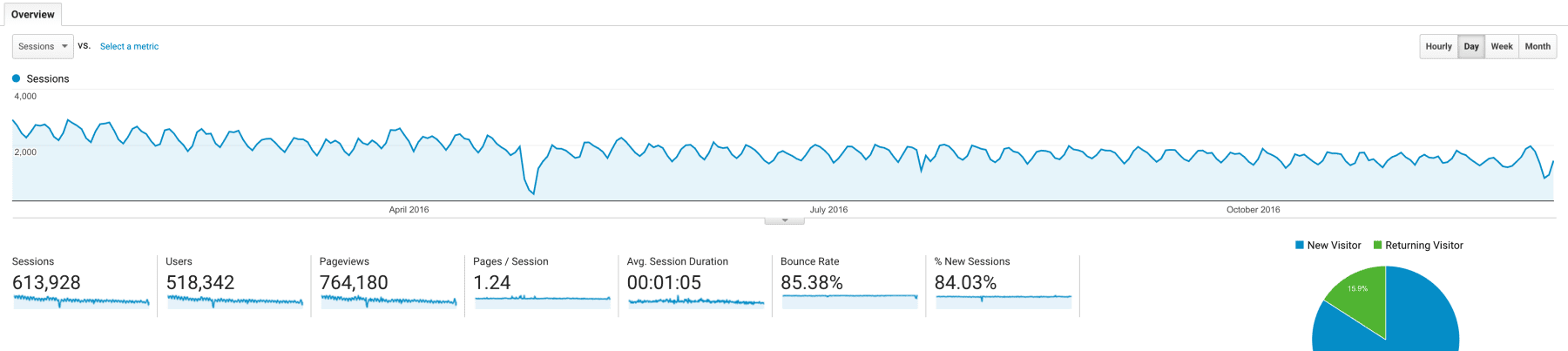
Getting traffic is a necessary process on any blog in any niche. There’s no magic behind it either. You simply need to get people to your site. Real people reading your content. Of course, it helps to know where these people come from:
Google traffic – the best kind of traffic is Organic Google Traffic. People search for topics like “best time to travel to New Zealand” or “easy way to loose 5 lbs” and your articles come up. You’ll need good relevant titles on your articles and a few other seo tweaks like choosing a focus keyword. The good news is this beginner SEO becomes second nature after a few articles!
Social Media traffic – the second most valuable traffic source for your blog will almost surely be social media. Facebook, Twitter and Pinterest are among the best. A random example, but you’ve got to see how much free Pinterest traffic the WordPress blog known as PinchOfYum gets!
Traffic from other blogs – when you guest post for other blogs and your article goes live, they’ll send you a surge of traffic. It’s your job to interest these readers enough in under 1 minute and capture these readers as email subscribers so they’ll become a part of your community too.
You’ll have to give your blog time to build healthy traffic. The screenshot above for example is just 1 year of traffic, about 500k visitors from 2016, but it took me nearly 4 years to reach this level. As long as you’re going up and don’t check the numbers too often you’ll be fine. 🙂
The most important step in creating a new blog that gets traffic is to focus the experience of my ideal reader. Put your self in their shoes. Then design your blog to provide exactly what that person would want to see, in the best order you can put stuff, so a reader has a really easy, amazing time on your blog. Creating a great user experience will definitely result in more shares. And as we’ve said since day one, it’s the readers who grow your blog for you! Think about all the links that get shared on social media. It’s us, the readers who grow blogs for them. It’s never the owner of Huff Post, CNN, Forbes, Buzzfeed, or another great blog doing the sharing him or herself, it’s the readers!
Demo blogs you can make today with our free tutorials
At the moment we offer 6 live blogs with complete setup instruction on YouTube. Click on the images to view the live demo blogs. Click on the titles to begin the tutorial.
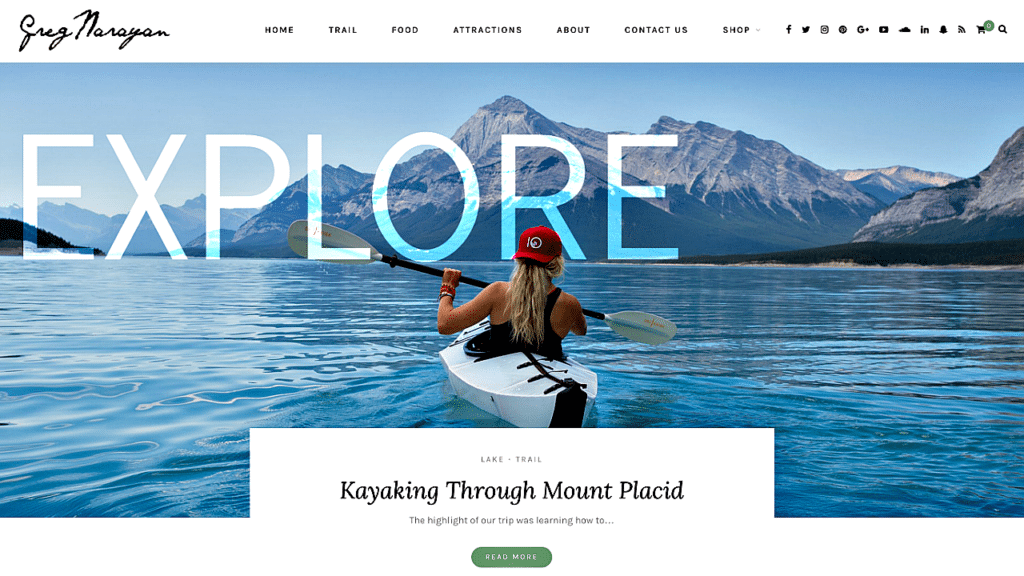
“Explore” – our newest deluxe blog for 2017 | Start tutorial
“Beginner” – huge logo, icons and easy email subscription | Start tutorial

“Sydney” – one page professional business website loved by many | Start tutorial
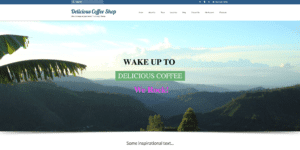
“Delicious Coffee Shop” – sell like Amazon in your own online store | Start tutorial

“Comfy Animals” – our best eCommerce tutorial from 2016 | Start tutorial
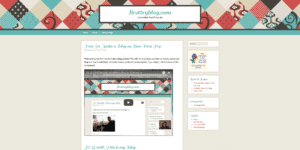
“The First Try Blog” – the blog that started the demos | Start tutorial

“GoDaddy Website” – Take a new domain to full website | Start tutorial
Personal aside: Know that I wouldn’t have taken months hand crafting each demo blog and website if I didn’t truly believe it could inspire you to start blogging.
The best place to self host a WordPress blog. Period.
If you’re going with WordPress.org like I do, you need some place to get you a domain name and host all your files and keep them secure. As with most things in life, you have a million options.
For example, you could host everything from your own computer like Evan Williams of Blogger or Mark Zuckerberg of Facebook once did.
Or, you could get the most expensive host with lots of security features and warranties baked in. This might make you feel safer (but why are these back ups needed in the first place?)

You could even hire a web developing company to host your site from their own server space and build it out for you. You’ll have to call someone to make any changes, but it’s still a good option.
Really, if you’re like me when I began on WordPress.org, you probably want something basic and cheap that works long-term (FLUFF NOT INCLUDED, TYVM), which is why I recommend going with a basic shared hosting plan from HostGator.
HostGator is what I’ve used since the day I got serious about blogging, and I trust their servers with 10-20 of my blogs and websites at any one time. Their customer service is world class and they’re the kind of place that’s ideal for beginners and advanced bloggers alike.
That’s said, do your homework.
If you do get setup with HostGator, you can use my coupon BIGBONUS for 50% off your domain and hosting. At 50% more than the standard discounts, this is the best HostGator coupon you’ll find and I’m proud to allow my readers to use it. It’s valid only for a limited time.
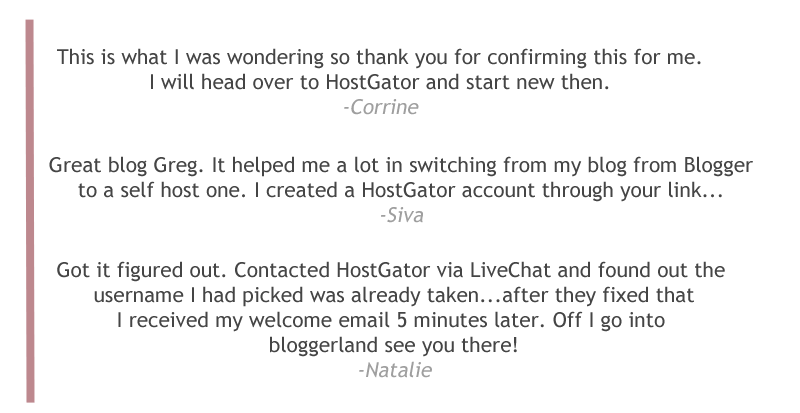
Check out what just a few people had to say:
And I’d love to hear from you too!
Disclaimer: If you do decide to sign up at HostGator and use my links to get there, I’ll earn a small commission at no extra cost to you. The cost is actually less because I’m able to offer you several discount coupons. Either way, this commission helps keep this blog free for a growing audience. So if you do click my affiliate link before signing up, thanks for your support. Drinks on me!
I’d write down beginner tutorials perfect for post-launch stages…

Whether you go WordPress, Xanga, Tumblr, LiveJournal, Drupal or whatever, here are some articles to kick everything off for you. These words form the pillars of the blog’s content and I deem all five essential for any new blogger hoping to dominate online:
- 10 Urgent Tasks After Your New Blog Goes Live
- How to Create an Everlasting About Me Page
- What is a Brand?
- What is Google Plus?
- High Standards: When is a Post Good Enough to Publish?
Our Free Community eBook (just a party favor)
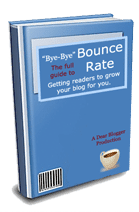
If you’ve made it this far, I want to introduce you to my newsletter and more importantly to bounce rate. Bounce a blog stat we definitely should talk more about but definitely do not want much of, because it’s the number of times people land on our blog and leave without clicking on anything.
Way back in summer 2012, right before we launched, I did an extensive case study on one of my other blogs to reduce bounce rate. The eBook explains it all, but here’s what happened:
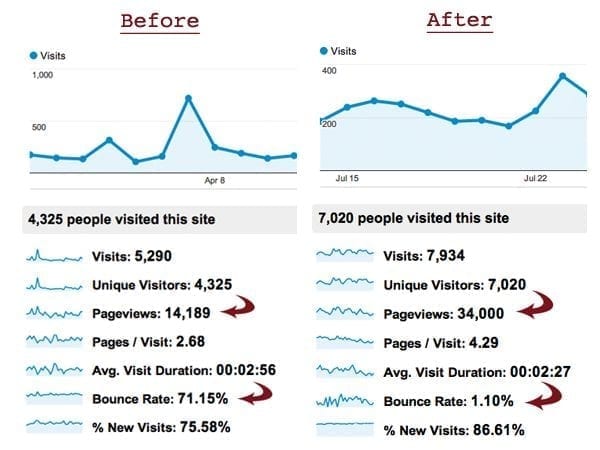
For the past year or so, I’ve been giving away my eBook Bye-Bye Bounce Rate for free to new subscribers. My plan was to start charging for the book after 1000 downloads, but now that we’re nearly there, I’ve said screw it. The book will always be free.
Save your money for the important stuff.
Pop in your name and email to get everything (it’s free):
You also get Blogging and Life – an ongoing digest of my struggles and successes in blogging. Please note this is a new project so there may be some kinks still yet but I can say the stuff I’ve already written is powerful as heck. If a strategy helps me, you’ll hear about it.
Connect with us: 5 outlets for more blogging questions and answers

I guess this is the point where I say “Like my page” or something cheesy, but unlike other bloggers who bombard readers with these messages, I’ll never do that. Instead, I’d like to point you to my social media outlets in case I’m not here when you have a question:
- Google+
- YouTube
- Or, our newly launched Facebook Page
I believe in same-day responses. None of this waiting forever crap, because I’ve been on the asking side, desperately needing a fix for my own work, and it stinks.
Lastly, I’d stick around to help
Because the worst thing that can happen when you buy a product, even something you love, is that feeling of “oh crap” I’m stuck, with something I don’t know how to use.
I want you to know:
I drop by every morning, and often times in the afternoon, from mobile, from my buddy’s, even at the dinner table to help out with blogging questions. I love helping out but that doesn’t mean I know everything either. I ask you guys for help all the time. So, where you can, join in! No gurus here, just a guy like you who was lucky to find his niche early on and a tribe of followers. So I’m curious, what will you find?
I hope you’ll join in, and look forward to chatting!
To Great Blogging,

Greg Narayan – The Blogger
p.s. If you found this page helpful (and have a Google account) please click on the “PLUS ONE” button below. I’m running a case study now to see how much “+1s” impact Search results, and even with just the support so far, the results are fantastic. Stay tuned because I’ll be posting on this soon…Thanks for joining in!
Hello Greg,
Success. A Short word, but it breaks us apart, to really get our name attached to it.
Quite interesting plan to achieve success, but having a plan and putting it into action are 2 different things. Many bloggers falls because they don’t take their blogging plan seriously and think that working with half heart will make them successful.
SO true! Thanks for writing this advice for everyone!
This really very informative and useful post. Seriously, this is some great stuff.
Thank you!
Seriously, this is some great stuff. I’m brand new to the whole deal, and have been researching and confusing/overwhelming myself for days. This and some other of your posts (“How Playboy Can Help Your Blog,” namely,) are really helpful. I think it has something to do with the concise-ness and readability of your work. You make learning fun! Yay!
I am using word press Blog from last 60 days but i failed to increases my traffic but after reading your article its really worked Thank you so much
Hi Greg
WOW what an article really i mad of you 🙂
This is awesome!!! Love all of the tips!!! I’m with blospot right now and I’m still determining if I should switch. I’m making money off of it and I’ve finally love the theme that I created with it but I’m wondering how hard it would be to switch and if it would be a good move. I’m in a pickle haha! This is great for when I decide if I’m going to switch or not! I’m glad that I found a theme that also is for WordPress!
This is a well thought, very informative article. But my humble opinion is that you should have included a little bit more information on hot to get traffic to blogs. Anyway very helpful article
Thank you
Hello, thanks for publishing such nice article and also, I have gone through your youtube video which has helped me a lot about to how to write a blog.
Also, Chech out this blog, Which links I am sharing with you about How To Finding Long Tail Keywords Tool To Write Blog That Go Viral After Keyword Research And Analysis
Thank you so much! This was very helpful!
Glad you found this ultimate guide 🙂 Let me know if you have any Qs on how to start a blog!
I can say that I proudly use Hostgator as my hosting provider since 2013.
My Wp blog works well on their server and I’m getting some traffic from search engines (Google mostly), but also from Facebook.
Posting your work in related Fb groups increases the traffic in your blog.
thanks.. upward to the next level
Well WordPress in my view is the most suitable and easy platform to make a blog…. btw thanks for making this post live for us 🙂
Hi,
There are so many various Online Platform on which you can write your blogs.
One of the most Interesting Platforms for blogging is WordPress and Joomla, Blogger.com . Also, There are other platforms as well.
Great guide on starting a blog for newbies.it is very useful to us
It’s competitive
Hey, on occasion I get a 500 website message when I view your website. I thought you may wish to know, regards
Fantastic blog you have here but I was curious about if you knew of any discussion boards that cover the same topics talked about here? I’d really love to be a part of online community where I can get feedback from other knowledgeable people that share the same interest. If you have any recommendations, please let me know. Thanks a lot!
thanks Greg for sharing up such an amazing and impressionable work. really great work keep it up.
Fantastic Post! You have mentioned very nice points for bloggers.
Hey would you mind letting me know which webhost you’re working with?
I’ve loaded your blog in 3 completely different internet
browsers and I must say this blog loads a lot faster then most.
Can you suggest a good hosting provider at a honest price?
Many thanks, I appreciate it!
Thank for sharing long and useful guide. How about blogger ? It’s google’s product and it dont need a hosting.
No prob, Louis. Blogger is AMAZING. But it has some unprofessional aspects and limitations that make it harder to use to blog for a living. For me at least, switching Blogger –> WordPress marked a big jump in my abilities as a blogger.
Good information Greg ! I was searching for this all over the internet and i landed here. Love how you have explained even the little things that matter.
I just started my website, struggling a bit for that initial traffic, hope you can help with that !
Cheers !
Thanks, Arpit! Glad you landed here and enjoyed this!
Hmm…try this one https://dearblogger.org/get-more-blog-traffic 🙂 How are you promoting your site currently?
I am leveraging Social Media. Site is about a week old now and had 15 odd articles. I am writing about 2 articles/day. Site gets about 50-60 views/day.
*Has 😛
really helpful ,
thanks .
No prob, you’re welcome.
Hello!
I was reading your blog and i read where you suggest that it is best to have a domain and hosting site. so i took your advice and i now have a domain. YEA!!!!! now i brought my domain from godaddy.com i was wondering if you could tell me if i have to use them for hosting also. if not what is a great hosting site that you recommend? my site is a lifestyle / beauty blog (or at least this is what i’m hoping for 🙂 ) With that said i just want to say thank you for your help in advance and i think your blog is a real blessing you have some great stuff on here !
Sydney
Hi Sydney!
Welcome! Glad you asked this question because it’s a common scenario for many of us.
GoDaddy – good for buying a quick domain name, not the best host
HostGator – convenient place to host and run WordPress blogs or any website, partially because user-friendly and lots of support
Here’s what you should do:
In Step III 3rd picture down above you’ll notice a box to check “I already own this domain”. Check that, then proceed with setup.
Then at the beginning of Step IV, HostGator emails you your password, hosting link, etc. This email also contains two “nameservers” which you enter at GoDaddy to basically say “hey, you guys take care of my domain, I’m going to put my blog over here.”
Feel free to post a comment here or email me when you get to this step. It can be tricky finding the nameserver input box at GoDaddy!
For folks without domain or hosting:
It is quickest to setup your domain and hosting with HostGator.
It is cheapest to buy a domain (for as little as $2-3 per year) with GoDaddy, then get hosting from HostGator, and do the nameserver step I explained above. This saves folks on average $3-8 per year, which is cool.
Both are quite common, and I’d bet several bloggers completed them just fine in the time I wrote this 🙂
Recently i have started blogging.It feels good.
Doesn’t it? Good stuff Johnson.
Ya me suscribi, soy un principiante, y todavia me falta mucho por leer bien, y aprovechar bien tus consejos, voy a estar leyendo tu blog mas seguido a partir de hoy…para aprender mas…
¡Bienvenido!
Usted debe comenzar en los puestos de principiantes, y buscar mi eBook. Tener la comodidad que usted está en un hogar de blogs con muchos otros la búsqueda de éxito. Más pronto!
Atentamente,
El Blogger
It’s me @Aydodol, what do I blog about? How did you start your very first post? Does it have to deal with introducing yourself? Also I can’t afford to grab a self hosting so I think I’ll go for a wordpress page.
Hey Aydodol,
You can expose your own ideas, what you have deserve and what do you want to blog. You can write blog post according to your interest, experiences, professional and dedication. Actually, Professional blogging is responsible and hard-work. However, your dedication and professionalism can help to start blogging easily. In this competitive internet marketing, you should have dedication, motivation, passion and professionalism for successful blogging.
if you can not afford for hosting charging to create a blog then think about free hosting on blogger (custom domain). Yes, blogger provides, free hosting with custom domain. you have to buy a domain and customize it on blogger. You can also add your blog on WordPress but have to pay for hosting charges monthly or annually.
Best of Luck !
Thanks for the reply sir Myhox. Where do I start, hmmm? I really like to play online games like dota2, League of Legends, etc. . . I also do forum discussions and watching movies to kill time.
In these days, Online games are popular and many people engages on online game. Thus, you can also start your blog through your interest- Play online game and Entertainment niche like movie review. It is also nice ways to expose your ideas and attract audiences. You can write review blog post about online games, movies, sports, comic, books etc.
A blog can become a powerful tool. Especially for people who want to increase their online presence. I enjoyed the way you broke down the basics of having a blog for everyone. Thank you for sharing your expertise.
Glad you enjoyed Kisha!
Great guide on starting a blog for newbies, I also have a complete series of not only starting a blog, but also take it to the next level on my blog.
Cheers Jon.
hi greg you might have answered this question before but i haven’t got a chance to go through all the comments, can you please help me? which social sharing plug in will allow me to cusotmize which social networks appear on my site?
Lots out there, but I use:
http://wordpress.org/plugins/twitter-facebook-google-plusone-share/
Makes adding Facebook, Twitter, G+, LinkedIn, and SU buttons easy and has options for borders and background colors.
hi greg, thanks for all the tips, one more question i have as i am getting started……im in wordpress as you recommended and in my post, if i want to enlarge the font (or bold it or change color) of a few sentences within the post, how should i do it? i searched around it seems like wordpress doesn’t let me do it but it seems a bit ridiculous not to be able to do the most simple formatting?
No prob, no need for “one more!” Love the questions.
You can definitely can do this and there are a few (easier and harder) ways.
I’d go with some inline styles like this!
dear Greg, thank you so much, i put it in and it works wonders! you are awesome!
the one thing i notice shared by all the great blogs is great pictures, just wondering, do you or they take all your own pictures? what if im not so great at taking photos or i don’t own any camera that takes such professional pictures?
Great question! Here are some options I’ve tried:
-Dreamstime (paid)
-Creative Commons (uses Google and free)
-Photodropper (WP plugin for easy embedding)
hi Greg, this is so helpful thank you so much! but what if all the names that i want for my domain is taken? how do i get inspiration for another really good and creative and easy to remember domain name?
You’re welcome! Stay tuned for new post on this topic…
Also, check out the story behind how they came up with “Twitter”, here’s a link. It always inspires me.
http://en.wikipedia.org/wiki/Twitter
And keep in mind .orgs are pretty awesome too 🙂
the tweeter story is interesting, i think i got a name in mind now! thanks for your response
i did follow word for word and created a blog although later on in the blog i realize there is a step by step video which is really helpful but came in when i was done with every step in set up….maybe the video can be posted somewhere earlier? but even without the video it is so easy to follow is what i am saying….thanks!
Hello! I recently followed your steps to create my own blog with my own domain. I followed all your steps through host gator, and then onto adding WordPress, but after I was done installing that, nothing worked. I couldn’t access the admin page in order to start working on setting the blog up. Nothing works and when I type in my new domain address it says server cannot be found. I’ve paid for a year and everything and I am confused as to how it works now. I thought I would be able to access and edit it as soon as I bought it, does it take awhile for all this to start working? Thanks,
Leila
Hi Leila – Glad you brought this up, it’s a common issue on any host as propagation takes effect. Basically, your local network needs to “refresh” and “see” your domain. If you’re in a tech-heavy city this happens every few minutes. If you’re out in the desert or rainforest, will be more like every 24-48hrs 🙂
Please post an update – is it working now?
HostGator: When will my domain start working?
Very nice blog and helps to setup a blog very beautiful . Plenty of useful tips which is really nice and helps to setup a blog for new comer as well as blog owner. I like it.
Cheers Mike!!
Awesome tips and really good information, my blogger is a mess right now, but reading great blogger will help me to do a better job .
Thanks Wendy!
I remember the days of editing my Blogger HTML sheet, fun but glad they’re over. Hope this helps!
Best,
Blogger
Hi Greg,
Thanks for this detailed guide. This is my first read about blog and you explained it very well.
Well formally, welcome Alan!
Happy to elaborate on anything regarding starting or launching here in the comments.
Best,
Blogger
Glad to visiting your site. Great article and good website.
Thanks Kawak!
Stay tuned for Tuesday’s new post and good luck on your blog.
Cheers,
Blogger
Thanks for approve my commen 🙂
I hope your blog visitors crowded and always successful
Awesome article ! 😀 thanks.. btw i love your design, which theme are you using?
Thanks Bipasha.
Currently running Daily, by Theme Junkie.
It was a simple transition for me to the premium world.
Cheers,
Greg
Great article and great site! Any specific tips on getting traffic when you are first starting out?
Hey Quentin! Try this post 🙂
Hi Greg, I really do appreciate your insight about blogging but I’ve got some questions to ask. 1. How can one integrate ‘ opt-in’ form. There’s this – admin@mydomain.com‘ that I saw on wordress, pls how do I access that mail. 2. I paid someone to register a domain for me but did not give me access to the control panel, said that he’s hosting his domain on same server. the question is how do I host my domain with another Host. 3. What is the difference between building a Joomla driven database site and wordpress, i.e can it be done on wordpress. Thanks as you responds to this.
Hey Paul!
This is going to be a long answer 🙂
1) If I understand you…typically your hosting platform sets up a custom email automatically. Do you want me to walk you through accessing that inbox and forwarding to your current?
2) That’s awful. When faced with this question, I recommend folks start fresh on HostGator. They let you setup a domain and cheap hosting quickly. Or, you can reset your nameservers if your domain is with GoDaddy or something, and still get HostGator hosting.
3) Joomla is noted for it’s ability to build complex corporate applications and reliability. WordPress it noted for it’s ease of use, elegance, and huge selection of themes and plugins. HostGator’s words, not mine. Either one is great. If you use Joomla, the first part of my guide above (before WordPress setup) will get you there just fine.
Let me know what you think!
Greg
hi! I’ve learn a few excellent stuff here.The clearness for your submit is just excellent and i could suppose you’re knowledgeable in this subject. I like your writing so much! this step by step guide will really helpful for new bloggers. keep recking with your writing greg 🙂
Thanks Naren! Really like those words 🙂
I publish 2 blogs http://lokenrc.blogspot.in & http://bongomoni.blogspot.in/. The 1st one is 3 language (German, Bengali + mainly English). The 2nd one is in Bengali. In both, I am facing a problem with proper display of the Bengali part. I use Bengali Unicode or Unicode compliant Bengali fonts n both cases
Can I raise my detailed question here?
Sure L N, maybe someone else can answer though, because I have no idea… 🙁
I’ll tweet this out.
Unicode compliant তিন রকম font (Shonarb.ttf, Siyamrupali.ttf, Vrinda .ttf) দিয়ে পরখ করে দেখেছি, তা দিয়ে blog লিখলে কেমন হয়। বাংলা Wikipedia-তেও এই কটাই ব্যবহার হয়। এর মধ্যে Shonarb.ttf-টা আমার সবচেয়ে পছন্দ। কিন্তু, প্রশ্ন হল, blog-এর মধ্যে আমি font কিভাবে নির্ধারণ করে দেব? Blog-এ font বদলের যে সুযোগ আছে তার মধ্যে এই তিনটে font-এর কোনটাই নেই। তাছাড়া, আমি কি করে জানব, যে সাধারণ পাঠক আমার নির্ধারিত font-ই দেখতে পাচ্ছে?
im having the similar issue, i am blogging in chinese but with worldpress i don’t get a lot of choices for fonts, in fact i get one. was wondering if there is a plug in for more fonts?
A good blog is important of you want to share you ideas to the world through a prolific platform. You will have to make sure that what you choose is unique.
Well said Abbot.
Hey Greg,
just a quick question.
You mentioned that you started an internship program for your university students blog and recommended that others do the same if they wish to grow online.
Can you kindly share the script/ad you used to recruit your interns and what your selection process looked like?
I’ve been meaning to get some writers for one of my other blogs and reading your post has triggered me to take action now!
Appreciate it.
Just Google “honest college internship program” 🙂
I actually like the style of your blog and user experience I want to implement such things in my new publishing website can you help me by giving any tips and suggestions on the existing design.
Thanks Dinesh!
Absolutely, but need more specifics…which features are you interested in creating?
Greg – I almost got to Part V & now I’m stuck. When I try to go http://www.yourdomain.com/wp-admin. to start exploring wordpress I get a site error message and my internet provider tries to re-direct me. Do I just need to wait for the domain to come live (is that even a thing? :)) or contact hostgator?
TIA
Hey Dani.
You’re almost there; assuming you registered your domain name with HostGator, they are just setting your new blog in place and making sure it’s just right. Give it a couple more minutes.
Support Chat is pretty fun, if you want though.
Good luck exploring WordPress in Step V 🙂 Happy to answer more Qs.
G
I had to do an account verification, just didn’t get the e-mail for another hour and it was past my bedtime 🙂 Thanks for the quick reply, I think I’m on my way now! Also, thanks for the great tutorials, I would have never been able to get this far without them!
Hi Greg, i am sorry, may be it’s a stupid question, but is word.press and hostgator providing the same services? do i need hostgator or can i do everything i neen on word.press? i am confused. What is what? Is the blog on word.press self-hosted or not?
Hey Karina,
Those are great questions – I guess I should add those answers in.
In order to use WordPress.org, the full version with all the good stuff listed above, you need to setup a domain and hosting on HostGator first.
So setup starts at HostGator, and ends at WordPress. When you get a domain name and hosting, you are “self-hosting” by definition.
Does that make sense??
Greg
Yes, thank you very much! Now it all makes sence.
I know this if off topic but I’m looking into starting my own blog and was curious what all is required to get setup? I’m
assuming having a blog like yours would cost a pretty penny?
I’m not very internet savvy so I’m not 100% certain. Any tips or
advice would be greatly appreciated. Appreciate it
To run this blog Andreas? Not much, domain and hosting are about the cost of one Subway sandwich per month.
If you’re not internet savvy, this guide should be perfect.
Use our coupon, dearblogger25, to reduce price.
Well Greg I really like your blog. I have bookmarked it and put it in my speed dial of my opera browser as number 1 page 😀 Well anyway I have recently started my blog about architecture 🙂 It has great design and is easy to manage. Now I have made around 20 posts by now. And I did my keyword resarch. And I have put most searched words in my post titles 🙂 For example keyword “Gothic architecture” has around 1000 searches on google. And I made a post about it and I did it 20 times like that. My blog has around 50000 words. Now my blog looks nice, has good content but NO TRAFFIC 🙁
I get around 3-4 visitors per day from google, yahoo 🙁 But I do get visitors from keywords which I used to make titles of posts so my keyword search helped 🙂 I get about 7-9 visitors from fb ir google +
So total 20-25 visits a day 🙁 Can you tell me what am I doing wrong? 🙁 This is really sad 🙁 I wish to have 300-400 page views a day 🙂 How to achive that it seems impossible 🙁 Will you try to help me? I have read most of your work on your blog but it seems to me that I did most of that 🙁
Also my blog url if you want to check.
http://architecture-hall.blogspot.com
I post words/picture posts. Words post are usually about history or architectual style.
Ok, hey again.
Firstly, skim this post on traffic strategies.
Your best bet sounds like guest posting on architecture niche blogs.
This would get your instant traffic through click thrus, and longer term traffic from Google organic search as you build a few backlinks. The organic process is obviously a bit more complicated, but basically try to get a few “SEO optimized” links in your guest posts. You want relevant keywords on the links, instead of just a link saying “click here” or something boring.
I’ll be releasing a major guide to organic traffic soon 🙂 It’s really that important to our success as bloggers.
If you landed 3-5 guest posts I can easily see you hitting that goal of 300-400 visits a day.
Have you tried sharing your blog among friends & family? These folks might be the first to comment and share your work. I know it sounds boring, but friends & family are huge for feedback and initial growth.
What else am I missing…?
Hi Greg again 🙂
I lije your idea about Seo links in “so called spaming other blogs” I will “spam” in other blogs but I will not post bad messages like check my blog. I am architect so when I see a house I can write big review about it so I will “spam” like that 🙂
I will write 100 words comment and I will find some nice way to post my linkvin those comments 🙂
Thank you Greg I cant wait for your post about Seo optimised links 🙂
Oh and one more thing Greg. You are right my friends are helping me to share the content 🙂
They are my motivation for now as they are the only ones who comment on my stuff 🙂
Good good, get them working for you. And commenting is a great habit on big blogs, better than most people even know!
Yeah I think it’ll be a Blueprint to Organic SEO: How to Get Google on Your Team or something along those lines!
Yes. 🙂
I cant whait for your post about Seo 🙂
Thanks for the tips Greg. I was able to start out my own site. I was also getting interested about SEO, can you please give me a list of SEO blogs that are good to follow? Thanks!
Hey John.
DailyBlogTips is great, as is ViperChill. I’d give each of those a few days of your time to browse through the archives! I’ll publish a post soon on dominating organic SEO, so stay tuned.
Thanks for commenting,
Greg
Awesome! I will start with with those 2. Okay, I will be back for more. Thanks so much! Sorry for the late reply.
Greetings, Greg! Your ‘start a blog in ten minutes’ has given me a starting point, but I’ve hit something of a snafoo post-installation. Fantastico claims I have a current installation, but when I try to open my admin page, each time I am told that the “server cannot be found.” I contemplated removing the current installation reinstalling, but I chickened out when it said something to the effect of “all will be lost!” Please share any wisdom, as I’m in dire need of guidance at this point.
Hey Laura,
Did you register your domain with HostGator or another provider?
Could take a bit longer for things to settle in if not with HostGator, but either way give it a few minutes and all should be OK. Keep me updated!
Greg
So prompt! To clarify, is registering the same as obtaining a hosting plan with Host Gator? I received the e-mail that includes my account info, and I can access my control panel. Is there an additional registration process?
Great! There’s no additional process. Just as simple as the Quick Guide illustrates.
Did you login to your cPanel and install WordPress?
I had installed WordPress before my initial posting, and it seems I should have taken your word, regarding giving it a little time. The site is there this morning!
Greg, you have aided in my entering a new world here. Any chance you can give direction on how one can select/customize their avatar/profile picture? For example, yours hosts a photograph of yourself. I cannot seem to find where I might change mine from the generated image…
Welcome to WordPress Laura, and glad I could help!
For the pic: Go to en.gravatar.com and put in your email, then upload a picture. The photo will automatically start appearing wherever you comment.
So I guess we’ll see that above whenever you do so 😉
Just a quick note: you can upload more than one picture on Gravatar.com and make sure to link them to different email addresses.
When you post a comment in the future on any blog – you can show different gravatar pictures, depending on the email you use in the comment form.
Thank you for sharing this great information. as a newbies it is really resourceful for me. i appreciate for sharing this pest post.
No problem Myhox! Great to see you commenting.
I’ve been surfing online more than 3 hours today, yet I never found any interesting article like yours. It is pretty worth enough for me. In my opinion, if all webmasters and bloggers made good content as you did, the net will be much more useful than ever before.
Thanks for the praise, Louanne!
A Long, long but informative post. As many others have said, it is a good guide for newbie which i am not but still i liked it.
I’ll visit your blog in future. Good luck.
Well this guide is for the up and coming bloggers, newbies included.
Come back soon Arslan, great to see a comment from ya.
You could certainly see your skills within the work you write. The world hopes for even more passionate writers such as you who are not afraid to mention how they believe. At all times follow your heart.
Always be bold Fred.
Great guide for blogging!
Glad you used it Zenee!
Best of luck on your blog.
I have recently started a website, the information you offer on this website has helped me tremendously. Thank you for all of your time & work.
Glad this helped Deidre. Good luck!
I’ve been meaning to ask… Do you recommend that I use two separate twitter accounts for separate blogs? Or should I use my same Twitter account to promote both blogs?
Hey Sarah! If the subject matter is similar between blogs I’d just use one. it’s a lot easier to maintain a consistent stream of thought, and followers, using one. That’s what I’ve found. Hope the blogs are growing!
What about when it comes to Google Plus? Right now, my Google Plus profile showcases my current writing role–both the company I write for and the topics I write about. But my “brand” is bigger than that. I know in the future I’ll write in different topic areas.
I’m afraid that if I grow my circles to focus on my current role and writing topic I’ll limit myself in the future. And I’ve been hesitant to grow my Google Plus profile because I don’t know to tackle this. So should my profile be more generic without a focus on my current role? Am I reading too much into this? 🙂
Firstly, make your posts public. This will really help get you more followers (if you want em).
Just add the green public “box” into +add more people.
I think branding is a bigger discussion though. I like keeping my G+ all about me and my blog and just managing one profile per network. So that’d be my advice.
But what is your goal long-term? How many brands? This should be fun to discuss actually 🙂
Make posts public, got it. One profile per network, I agree. Life is already too complicated as is.
And my brands? My long-term goal? I think you found the root of the problem. Because I have no answer! I have a background and education in technical writing, ended up by accident in instructional design, and now I do web and blog writing. My experiences are really scattered, and I haven’t found my niche yet. I love web and blog writing more than the others–it’s just so…alive, for lack of better words. But I don’t have a blog of my own yet because I don’t know what area of interest I want to invest in long term. Does this make sense?
Seriously, this is my current life dilemma in a nutshell. I want to write and pay the bills, but also I want to love what I write about. And I love a lot of things–I feel like I need to focus on just one.
This is becoming about so much more than Google Plus, hah!
Greg, The popularity of your popular guide is increasing everyday – A lot has improved since I last visited.
Keep rocking my friend.
I love it. Ya know, I think you posted comment #1 here.
How’s the weather over there at G & N?
Yeah, but why my first comment went down instead of being at the top of all?
GAN is doing great, but I’m writing less these days. Seems I’d also have to start updating my blog daily for sometime? Should I?
I made most recent at the top, thoughts on that? Sry 🙂
Yeah I would seriously try it. And obv tweet, share a ton about what you’re planning to do.
Posting everyday brought in a handful of new and curious readers, and it sort of cleared out the idea closet a bit, ya know?
Hi Greg,
Hats off for providing such valuable, straight to the point content! I’m now regularly re-visiting your blog as a continuing point of reference. 😉
I know you posted about how you secured a PR3 in only 3 months but I would really like your strategy on how you landed such great guest posts on those huge authority sites and what are your best tips for me doing the same?
Thanks in advance!
Finally, a comment from Shola 😉
Anyways hey. I think it’s all about the intro email. I get a lot of spammy emails regarding guest blogging, so I know exactly what DOESN’T work when contacting someone.
If you can 1) highlight your work, 2) show genuine interest, then 3) deliver premium content, landing a guest post is closer than you think.
Above all, be a human! There’s also a social media site of it which I can explain if you want.
Yep. I finally got around to it 🙂
I’ll definitely be using those tips in my guest posting strategy combined with the ones you already revealed in your post.
I’d like to take you up on the offer of explaining the social media side too…
Hello Greg! This post couldn’t be written any better. Reading this post reminds me of my previous roommate! He always kept talking about starting a blog, but never got around to it. I will forward this post to him. Fairly certain he will have a good read. Thank you for sharing!
Thanks for sharing Dear Blogger Donnetta!
You are amazing 🙂
Well, http://www.pluckedstringedinstruments.com is my product, but I don’t really know what it is, or how to “promote” it. After looking a little at your site, it seems that you might be the best person to as a couple questions.
1. Should I treat this site as a “blog”? I update it as I go, so it could have a lag of a month or so between posts. Since I have it categorized by every way, but the date, it’s not chronological, as you can see.
2. I have redacted a lot of the names of the luthiers I have dealt with. My reasoning is because I may want to do business with them again, and I don’t want to give them a hard time in the public. Well, my parents seem to think it would be better with their real names, and that the luthiers would see it as publicity. What do you think? It would be tough to go back and contact them all. (I have others completed not published yet.)
3. How would you go about promoting the site? I have went to a couple forums sites, but I have already have had my hand slapped for self promotion. I am not sure how that’s possible when I am not selling or promoting anything there. It’s basically just a bunch of text and pictures. Also, I will never sell anything on it. It’s not there for school, money, just educating the music lovers like myself. There is nothing like it out there, but I know it’s a small niche audience.
Hey Jason,
Soo…great questions. Here’s what I got:
1) Yes. Update it, if possible, once a week. Even shorter posts, images of guitars, or real photographs would keep visitors interested.
2) I love openness, and any publicity online is (often) good publicity, so go for the names.
3) Guest post! Contact major hubs in your niche with consistent readership and write free, awesome articles for them. I’d only use forums to learn and ask questions for your own knowledge.
What do you think? Sounds indeed like you have a unique niche opportunity here.
You need to be a part of a contest for one of the most useful sites on the net. I will recommend this website!
Whoa thx Marcia! I’m always up for a contest…
This is great – especially good for new and upcoming bloggers these days. Maybe, possibly, I would add one or two WordPress plugins (there are so many) but one of those plugins that would automatically tweet the post to your twitter or FB, when you make a new post on your blog.
Hey Jatin!
Yep, this IS great for new bloggers! Glad you think so too.
Good suggestion, though that video above shows how to add the TF social share plugin…
Guess we thought along the same lines 🙂
WordPress is definitely a good place to do it, since you can create pretty much anything you want but in the end it just depends on the content of what you write rather than where you write it.
Well said!
Some of the great stuff that I’ve seen in recent times. My blog is suffering from low readership. I will consider the suggestions given by you and hope it will back to normal soon. Do you also offer SEO consultancy?
Hey there Rinkesh,
Totally thought you said “Do I run an SEO consultancy” like a whole business! 🙂 Maybe I’ll start one…
Yes, I offer lots of SEO help, what’s up?
Thanks for the great tips, Greg!
I’m going to go the WordPress.org route. I already bought my domain – http://www.passthegoldfish.com. I know it’s not an SEO hero, but I think many moms (target audience for this one) would see “goldfish,” think “toddler,” and be curious, which is what I want! Plus, I’ve got ideas for expanding the brand.
I’m hoping to build from this domain and expand into different topics – Places where my readers can find advice and tips packaged in stories that make learning more fun. I’ve used my domain “formula” to come up with unique ideas for tips on military life, public speaking, writing, career goals, health, beauty, philanthropy, and more. I think it could grow!
So here are my Qs:
1. If I don’t want “mom” to be in the title, is it helpful to include it in the tagline and this, metatags (or whatever ends up in the Google snippet)?
2. Am I crazy, or is it smart to do this since it’s for future branding?
You mentioned you’re not a fan of blog transferring, but I’ve written some signature “flagship” content back on my storiesfromascreensaver.blogspot.com blog.
3. How can I incorporate those posts into my new domain?
4. What’s the best way to introduce the .com to my current readers?
5. Is it possible to have 150 questions in just one comment? 😉
Thanks so much for your help. I can’t wait to get started!
Actually can’t wait to respond Nikki. I gotta catch a train home now but I’ll add more to this comment tonight!
Perfect! Looking forward to it 🙂
Ok, I’m just gonna jump in, seems like you’re pretty eager 😉
First, I’d set up a Gravatar for sake of comments. That’ll appear everywhere you comment.
Aright! Domain sounds good. And alright again! I love your ideas for expansion. Corner that niche.
Once your in HostGator, fill in your domain under “I Currently Have a Domain Name” before continuing to step 2. This is also where the coupon code goes in.
Did you buy the domain with GoDaddy? You’re going to log in to GoDaddy and set nameservers to point to HostGator. I can help…or Google it, super easy.
Don’t stress meta tags. Google dropped meta tag importance out of the formulas a while back because people attempted to rig them. Instead, focus on permalinks. That’s what I always tell people. Write posts like: passthegoldfish.com/mom’s-guide-to-post-labor-beauty (just an example) but see how that link has keywords in it.
Smart permalinks can help hundreds more people find you…
Yeah no, you’re smart 😉
You should reference your old posts on a “Popular” or “Best I’ve Written” page on your new blog. Get the backlink juice flowing.
As for introducing the new one, be really creative. This intro is a moment you can only use once (per person). What are your ideas so far?
Hey, anything is possible, especially in blogging.
Eager is the word! Nailed it 😉
Based on my week of obsessive reading and research, I’m aware of the permalink tip. Used it for today’s post, actually! http://storiesfromascreensaver.blogspot.com/2013/02/raising-a-mamas-boy.html
I am so ready to make the move, but want to ensure it’s as strategic as possible, without getting too stuck on perfection.
Since my readers to-date have mostly been family and friends, I’m thinking of involving them in the process. I may even write a post about my new venture asking for ideas and support (shares) when the time comes. They’re the ones who will help get the word out!
I want them to know I’m about to start taking our fun site a bit more (yet not TOO) seriously. I need to change the mindset – i.e. comments are best IN the blog itself, make it a habit to share it if it resonates with you, etc.
Before I start dreaming of the big premiere, though, I need to figure out the best way to organize it.
1. If I’ll be talking about mostly mom stuff on this one, should I keep it simple like a basic blog, OR should I go ahead and right off the bat include with “tabs” to categorize and plant the seeds for my other “Pass the” areas?
2. Think I should ask graphic design friends to help create a brandable “Pass the…” logo that could be used across multiple sites one day?
Dreaming big is fun 🙂
Thanks again, again!
I’m loving your approach! You’re gonna launch like 10x stronger than I did!
Yeah, let folks know you’re serious. I think just being on WordPress.org, maybe starting an email list, will send signals that you mean business.
Or tell them 🙂
Go in super focused and mommy-status!
Most bloggers I see who err fail, start too big, cover too much, and spread themselves thin.
Definitely write a welcome post incl your mission statement. From there, I’d go for 2-3 other exhaustive posts that hit mom topics in ways NO ONE has seen before.
Let people absorb and connect. It’s always tempting to hyper publish but trust me, the result is frustration.
I explained the DB launch here.
Yep, get a logo. This was hard for me. Shoot for a motif, ya know? A theme that will constantly come up and is loosely related to your mission.
This is fun 🙂
Makes sense to me! I want to be sustainable, but not too limited. Still, a focused approach will help build a little tribe, then I can start presenting the other facets 🙂
Should my mission statement include my eventual goals, or be specific to http://www.PasstheGoldfish.com and the content I’ll cover there?
Think I should buy a few of my other favorite domain names?
The design part should be fun too! Just gotta find the friends to help 🙂
Totally fell asleep at the keyboard Nikki.
Umm, I’d shoot for immediate to 6 month goals. Specifics!
Yeah you could snap up a few domains, if they seem competitive.
The “Baby” plan (middle option) at HostGator lets you host multiple domains fyi. That’s the plan I use! 🙂
Good to know!
Still feeling comfy with the domain name and full-mom-ahead approach! Still asking around to see who may be able to help with a logo and header.
“Worst” case, would you recommend just moving forward with the best I can find in WordPress then adding a logo later, or wait until I’ve got the perfect logo to launch? Again, I’m not in a rush, just want it to be right!
Also – where can you point me for ideas on monetization? I realize with an audience of mostly moms and those who love them, the opportunities for “product” sales are not as obvious as most other niches. As of now, I imagine that my “products” will be helpful and entertaining books that make their lives easier (and more enjoyable!). Not sure yet if they’ll be ebooks, self-published, or traditionally published, but that’s another topic altogether!
The goal isn’t just to make money, of course, but I do want to build a successful business that helps people in the long run!
Most of what I have found in my research are examples of less personal (building a business, making $ online, selling specific products and courses) blogs or all-personal (mom blogs that talk about their families, do product reviews, and make $ from ads). I’m hoping to bridge the gap and do both – provide useful info and solutions packaged in a family and personal context, both on the blog and in eventual published works. I’m just having a tough time finding examples of folks who have done that!
Look forward to finding out if you know a secret I don’t 🙂
I’d wait, get the logo on-point then launch.
But you could still quietly start the blog and get used to things pre-launch. That’s my fav approach.
I’ll be honest, you won’t make any money….at first. Do you have an immediate way of sustaining income?
You have to build a loyal audience, and have given to them enough that you can ask for small favors (like clicking your affiliate links) in return.
But it sounds like your determination WILL get you there. Just don’t rush the $$.
One of my first posts might help: dearblogger.org/how-to-blog-for-money
Established mommy blogs make a ton (silly right?). Don’t know any yet? Really, just go meet some. Shamelessly intro yourself. They’re out there…
hey,
thank you once again for responding to my queries and helping through the process. Would you mind giving brief explanation on that “outbound links” thing that you mentioned in the last line of your previous comment. I didn’t get it. Hope I am not eating your head by asking silly questions, sorry if I have done that (unintentionally). Thanks….
Ha ha no worries, love the queries keep em coming 🙂
Outbound links go from (for example) my blog to your blog.
The way Google designed PageRank, sites have high PR when lots of links go towards them (inbound).
And, in the olden days, having outbound links helped a site’s PR too! But that changed…
Now the consensus is to have fewer outbound links so as to preserve your own PR…
So when a site does link to you, it’s an awesome favor.
I’m going to plug in Ehsan and see his thoughts bc I know I’m missin something…
If the number of outbound links are higher than the inbound ones, than It will lower your PR – But It’s okay If the outbound links are Nofollow.
Outbound links are the links pointing to other domain from your website or blog are outbound links
You’ve to have more links from high PR websites coming to you, which will eventually help you in increasing the inbound links, but you should also consider opting an outbound link strategy to make sure your blog is never devalued. It plays a big role in SEO purpose and lets the search engines know about your specific niche.
Overdoing it will affect your ranking, so avoid too many and irrelevant outbound links.
Hope that helps – Thanks Greg for letting me know.
I think the reason you’re not using CommentLuv plugin on Dear Blogger is because there will be too many outbound links, isn’t it?
Thanks for the awesome insight Ehsan.
Hope that made sense Tribikram.
No no Ehsan! That link feature is cool. I just love the standard comments, they’re so classic, so WordPress.
hello Greg,
thanks a lot for all these advice, of course I am gonna use those shortly.I one more thing, I want to ask you. Page ranking of site is depended on back links generated/referrals or the traffic/number of audience you are getting, like how many folks are hitting like and making comments?And does this page ranking matter as long as earning from sites/getting ads or other kind of monetizing is concerned or it is mainly to give your site huge popularity?
Glad my advice helped!
So…PageRanks depends on credible backlinks and inbound links you create. # of comments and Likes definitely is a factor in Search ranking, but probably won’t increase PR as a number.
With higher PR more ways to monetize will open up…that’s one way to put it at least.
If you have too many ads with outbounds links that could very well lower your PR. Keep that in mind.
Hi Greg
Thanks so much for answering my question regarding getting a logo for my blog.
I need your advice on something, i have just about finished my first e book titled “Give Me My Visa” which is a book that focuses on the dreaded F1 visa interview which is the interview that foreign students need to pass before they can come to America to study. Not to praise myself here but the book is actually quite good and will really help anyone who reads it.
My question is, do i give this book out for free in an effort to attract more people to my blog or do I actually sell it (thinking of $10)? I see lots of bloggers who give out free ebooks (you included) and I was wondering if that’s something you might advise that i do too.
I love it Alexander. Sounds like niche-narrow, high demand content.
I think the question of selling is one of audience. If you already have a big audience who trusts you, go for the sell.
If you’re building a new audience, free eBooks can attract new fans and convince them you know what you’re doing.
Just my 2 cents 🙂
But awesome comment, hope to chat with you more around here.
Thanks Greg.
Hi Greg,
great article indeed. very useful for the starters. I found it very inspiring the way you have come along with your journey from a starter to a very successful blogger and founder of Dear blogger. Actually I am about to start my blog (which is about my profession as well as passion). I am looking to network with a pretty large community of peers, and professionals who belong to same field, through this during the course of time. I am very serious about it, and want to motivate considerable time from my daily schedule. I have planning for this blog to start for last couple of months but could not execute due lack of proper blogging knowledge and resources to publicize it to fullest. Can you kindly give me one suggestion.Should I start my new journey of blogging on WordPress.com or WordPress.org ?Which one you think is suitable for me?Better to start with the free one then eventually switching to the paid hosting services for better maintenance may be after a month or so? It will be great if you can give some fruitful advice about how to publicize it in a bigger scale while launching for the first time. Looking forward to follow your blogging tips in your blogs and learn some useful skills.I am a researcher and my blog is going to be regarding new concepts, and innovative activities, research. Thank you very much in advance. It will be great If I can have your email and connect with you through social networking medias.
Hey Tribikram,
First off, happy to help you through the process. It’s exciting starting up! Ahh, reminiscing… 🙂
Based on your needs (serious blogger, large community, bigger scale) WordPress.org is a really good choice. You’ll enjoy the designs, plugins, and even ad options.
You could start on .com, but that transfer is rough and you’ll actually work/pay a lot more starting .com and transferring later.
That’s sort of why I made the video, to get folks setup the RIGHT way at FIRST. Then you’re done! You can sit back and just blog which is awesome.
I’m at greg@dearblogger.org for any really sensitive questions, but comments right here would probably work better 🙂
Really good blog, thank you very much for your time in writing the posts.
Yes this did take time Angel 🙂
Always happy to help.
Greg, believe me or not, I’ve always thought like, ‘Oh ok, I’ll get my free WP blog to advanced level’. But seriously I have never determined to do it. But after reading your this post, I’m totally in magical sensations. I have resolution to share and it’s “I will follow the stuff you have written here in this post and I will take my blog to the next level. I will also get rid of free WP blog.”
thank you so very much Greg for such an inspirational post.
One question; Will I lose my current (FreeWP’s) readership/subscribers/AlexaRank if I get to WordPress Org like Pro?
Hey Abdul!
You’re welcome, super glad I’ve inspired you 😀
What’s your current blog URL?
Here’s a tip: I feel pretty strongly bloggers should just start fresh instead of transferring work from blog to blog. It’s just awesome having two (or more) blogs to link back and forth from, and readers will respect you a bit more when you talk about your blogs, rather than “blog”. From experience it’s a really awesome refresh, as opposed to a headache tracking down and re-editing old content.
But stats you’ll keep, whether you keep the old blog, or do a transfer.
Let me know how else I can help!
Hye Greg,
Thanks for the very warm welcome. I am honored.
My blog is abdolrauf.wordpress.com I have no big number of readers, I know but I wanted to keep my name as brand, haha.
But deeplying listening to your tip regarding transfer; I agree to what you say. I will definitely follow to what you have said. I’d love to start from the scratch.
And I have really no words to thank you for future help. I will catch you whenever I struck on the way to blogging. You are my guru from now and onwards.
Thanks again.
Proud to be your guru Abdul 🙂
Hi Greg, thanks for taking a look at my blog and for replying to my email quickly. I am not sure if you noticed but i dont have any logo for my blog. How important do you think it is to have a logo for your blog?
No problem, had fun responding.
It’s very important, but DON’T RUSH IT. You’re better off waiting, developing content, then putting one up, than putting up a half-assed logo straight away.
Don’t want to confuse people.
Ok man. Thanks for the advice. Guess I am gonna focus more on content for now.
Just bought a blog WPBlogTips.com. I have been looking to start a new blog for a long time. But I am so lazy. So I changed my mind and bought a blog.
To buy a blog, most of the people search only at Flippa.com. But for me, bidding is frustrating. Follow these steps to buy a blog outside Flippa.
Use Google efficiently for acquisition: Search with the phrase like “blog for sale”, “site for sale”, ” website for sale”, i.e. including the double quotes. Thousands of blogs may be kept for sale without listing on any sites like flippa.
Chances are high that you can buy one in your loving niche without the pain of bidding.
THIS IS AWESOME Shahzad! (congrats btw)
Readers – Does anyone else have experience buying/selling a blog??
Greg, I think you should make systematic arrangement here like discussion board/forums, if you really love to see big discussion to be going here on any topic.
I don’t believe that most of the readers will see or read carefully till the end of the comments. Test some simple plugins like bbPress or something else if you want to make Dear Blogger, a real blogging answers community.
Awesome idea Shahzad, that could be the next thing here…
Congrats Shahzad, I don’t have experience with buying/selling blogs and never did it.
No problem man!!
I am coming with BIG gift for you that you will definitely like.
A free ebook: How to Buy Sell Websites
http://www.wpblogtips.com/buy-sell-websites/
🙂
Nice Shahzad! What type of websites? Blog help ones?
Hey Greg, Shahzad did a guest post on my blog on this topic where I plugged in Daniel Scocco to share the knowledge, here’s what he says regarding buying a blog and starting a blog.
Elance is for content writing projects and the rates aren’t good at all. And the thing is that you have to compete will a lot of people to get a project. And I never got reply from any pro blogger job board’s advertisers. Bad Luck 🙁
It’s competitive…but TLA? They may have advertisers in camera-related industries who are interested.
TLA?
Text-Link-Ads. I explain them in this guide 🙂
They aren’t replying :/ no response and i told you about my blog. I am searching for good writing work now and I can cover any kind of topic e.g web design, technology, gadgets, if anyone knows here about some good blogs, please help 😀
Hey greg please make a post on this content thing please. How frequently one should post, how many words each post should have, what about quality, how to manage time. I will be waiting. Thanks
In the back of my mind Arfa, will get that one going… 🙂
Hello Greg, hop you are doing fine. As a writer I am searching for some blogs that pay good (it would be fine if they pay just ok). Let me know if you know some. Thanks
Hey Arfa,
I’m doing well. I’d try Elance and the ProBlogger job board. Elance has been profitable for my friends in blogging.
Oh, and I also like Text-Link-Ads, did you already try them?
Let me know what you find!
Hi Greg!
I’m striving with my blog, because I launched it, but it seems dead: no readers comments,
no interest on social media I have….
I think I’m doing omething wrong…
What could I do to solve?
Thank you!
Ago
Hey Ago…oh man, the million dollar questions.
It’s key to have visitors who are REALLY interested in what you’re offering.
Have you guest-posted on musical blogs?
Not yet, because it’s hard to find musical blog on my nich (play popular songs on piano).
I thinked to do piano cover collaborations on youtube to drive traffic on my blog.
Do you think it could help Greg?
Yes great idea, YouTube it Ago! That could be your goldmine…
Well I’ll do, thanks so much Greg! 🙂
Hey, Greg–What do you think about overviews to blog posts? I’ve been asked to include them at the top of my posts in the form of a 3-point bulleted list, but our articles are pretty short (300-600 words). My thought is that if my bloggers and I are using effective headings to guide readers, then readers shouldn’t need an overview for our short posts. But I might be wrong. Thoughts?
Hi Sarah,
Well, what is the goal/purpose of the overviews?
Headings can do a lot…or labels…
Greg
Great question–the overview is meant to provide the reader a summary of what the post contains. They can choose to continue reading or move on. This is why my thought is that the headings should be enough since they, themselves, are kind of like an outline of the post. Readers should be able to determine what they read in the article based on the headings, right?
Way I see it headings keep a reader on the post, but titles, hook, strong copy in the intro will get them to read.
Problem with overviews is they’re just hard to style attractively. Unless you have a way….
Do you have a web designer that could make labels? Hongkiat puts tiny labels before first word of each post… “WEB DESIGN” or “TOOLS”…that may be a cleaner solution.
No, our overviews aren’t very attractive–this is a big reason I advocate that we do away with them. Great suggestions, I like the label idea. Thanks for the help, Greg.
Greg, I couldn’t have found your article at a better time. I’m really trying to better understand the process and find my niche. I even participated in Darren Rowse’s webinar this past Tuesday – super helpful for me. My concern is whether I’ve made the best choice in using Weebly. It is simple to use, but now I find I want to do more than it allows. Is it possible to take my domain elsewhere and transfer my blog to WordPress? I would hate to lose everything I’ve done this far.
Hey Des,
Good to see ya here. My first q is who is your blog host? I think your priority is keeping the domain, but transferring all content can be a mess.
Do you pay for Weebly?
Greg
Well, Weebly is the host. I paid for my domain, but there isn’t a monthly fee. I can upgrade for more features, which would cost about $4.50 per month for the shortest term.
My domain expires in April of next year and will cost another $40 at that time.
It sounds like you really have to switch to WordPress 😉
Are you against starting a new domain/blog? Could be a good way of showing off what you learned.
I’d definitely like to keep my domain name. I’m just not sure what my “thing” is yet, and I’m still in the infancy process of blogging (I think). Maybe the problem is I don’t want to stick to one thing to write about? I really don’t want to leave everything I’ve done behind and hoped WordPress would allow for a transfer. You know, when you change relationships, you still get to keep your stuff, right?
Haha great analogy!!
Can you send me the link to your weebly blog?
Being specific and targeting one niche is crucial for building a following…but maybe you just want to write?
FYI I have a few blogs, and leverage them together for more traffic, it’s really helpful.
Okay, here it is. Remember I’m a newbie, so be kind.
http://www.desireegonzalez.com/
I could see maybe two types of blogs, but not confident enough to take that leap yet. But you’re right, I kind of just want to write about any little ol’ thing that pops in my head. Very much appreciate your input! Thanks.
Des, it’s awesome:
1) Love how the pages “pop out”
2) The photo reels…nice!
3) Buttons, links, tabs all feel clickable
4) Amazon ads….solid choice, hope they’re working
5) Content…is this a dieting blog? Because it could be!
6) You should move to WP.org if you need more. I have a guide here and recommend Theme Junkie for layout/premium theme – the support forum is seriously amazing and their admins would help you design a new blog just like your current one.
All I got for now! More questions welcome though.
You are quite amazing to have an taken the time to do this and I can’t begin to tell you how grateful I am. It’s very encouraging for a newbie like me to know I’m on the right track. I have to say I did apply some of the advice I gained from the webinar last week, and will continue to do so.
It really isn’t a dieting blog as I honestly do believe being on a diet is self-afflicting pain. I have a hodge-podge of topics on the site, but I do like to cook…I’ll figure it out.
WordPress does seem like it’s in my future as I do need more (especially after an hour’s worth of work being wiped out as I went to publish last night). I will review what you have provided me and feed off your encouragement. =)
Thanks again!
Great post Greg! A couple days ago, before this post I bought a domain name, and hosting. I already have wordpress installed, and already have made a couple of posts.
I am currently trying to figure out how to get readers and make friends with other bloggers. I am having trouble figuring out how to find readers, because, I intend to have my posts based on life views/observations. So there will be a wide variety of posts.
I already have started a twitter account for my blog, and am going to start a facebook account.
I also am going to try and get my google adsense account approved, because I would eventually like to make a bit of an income off of my blog.
I am definitely going to search throughout your blog for more tips.
Thanks =D
Sounds like you’ve been hard at work Ryley. Yep, you’ll find a lot here…
Make sure to do these things asap:
1) Submit blog to Google
2) Setup Analytics account
3) Get a Gravatar image and keep commenting on cool blogs
I’d do those even before the social media.
Happy to help more,
Greg
Hey thanks for the tips. I just finished doing everything you suggested. So hopefully when I leave this reply my gravatar shows up.
I was wondering if you could suggest some interesting/cool blogs that I could check out.
Thanks, and I appreciate all of your help.
Hmm, the gravatar isn’t showing up, and I put in the write email address. Does it take a while?
Gravatar should be instant, but make sure you’ve actually confirmed the image (click on it once uploaded).
No prob…oh man there are lots of cool blogs to follow. What niche?
I did confirm the image, so I am not sure why it isn’t showing up.
I am interested in technology, so if you know any good blogs.
Oh and if you know of any humorous blogs also!
For tech – try Mashable and Gizmodo. Have you read either?
For humor – try HyperboleAndAHalf…that’s one of my favs
Gravatar image is workin’!
I have heard of both of them, but haven’t read them as far a I know.
I will definitely check out all three of them.
Thanks so much for all of your help so far. I have learned so much in the past few days =D
A layman is someone that has little or no idea of something, or let’s just say a novice
Great word Lakotai.
Great guide greg, one thing this guide is different from other bloggers Is because its very easy for a layman to understand
What’s a layman…?
Seriously, this is some great stuff. I’m brand new to the whole deal, and have been researching and confusing/overwhelming myself for days. This and some other of your posts (“How Playboy Can Help Your Blog,” namely,) are really helpful. I think it has something to do with the concise-ness and readability of your work. You make learning fun! Yay!
Keep blogging Kevin! And keep commenting here 😉 Really glad I’ve made the learning fun!
The Blogger
I’m impressed by your writing. Are you a professional or just very knowledgeable?
Definitely the second, Andres. I love my line of work and it inspires me to become more of an “expert” every day.
Great guide on starting a blog for newbies, I also have a complete series of not only starting a blog, but also take it to the next level on my blog.
What do you mean by “next level?” 🙂